 FloQ
FloQMail. Chat. Codes. Shared inbox, team chat and 2FA codes in one app
Connect your team mailboxes, see who already read a message and who is replying, talk it over in chat and share sign-in codes without passing a phone around.
Download free
Desktop
Mobile
Free during early access · Servers in the EU · Ready in 2 minutes
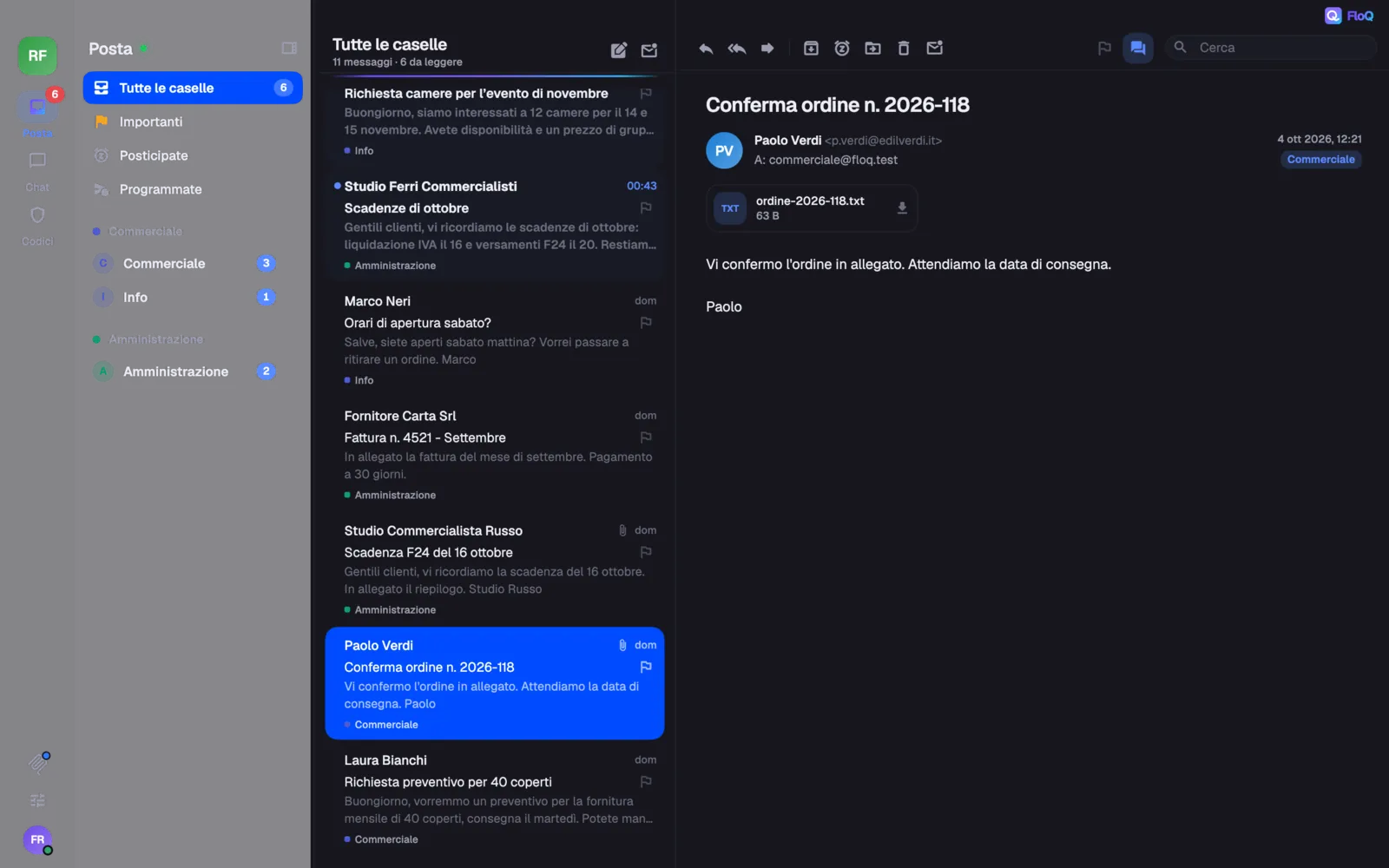
Team mail without forwarding
Connect Microsoft 365, Gmail or any IMAP mailbox and choose who sees it. Everyone knows who already read a message and who is replying, answers from the right address and searches every mailbox at once.
- Team mailboxes and personal ones
- Read by and replying, at a glance
- Search every mailbox at once
Team chat, right next to your mail
Channels by department, threads, mentions of people and roles, and files, in the same app as your mail. You choose who sees and who writes in each channel, by role or by person.
- Threads that keep the channel tidy
- Mention a whole role with @Role
- A mail into the chat with “Discuss with the team”
Verification codes, shared with care
Codes for shared accounts are generated on the FloQ server: the secret never reaches anyone’s phone. You decide who sees each one, and on iPhone they open with Face ID.
- Mine and shared with me
- One click copies the code
- Every use in the activity log
In your pocket too
The same FloQ on iPhone, iPad and Android, with notifications only for the mail and messages that concern you.
Get the beta app


Private by design
- AES-256-GCMEncrypts team data
- Argon2idProtects passwords
- TLS 1.3Protects the connection
- ageEncrypts backups
- Servers in the EU
- Your team’s data lives on servers in the European Union.
- A key for every team
- Mailbox passwords, tokens and 2FA secrets are encrypted with a key of their own for each team.
- Mail bodies stay with your provider
- FloQ reads the text of an email when you open it and never writes it to disk.
- No ads, no tracking
- No analytics tools, no profiling, no data for sale.
Details in the privacy policy, including how FloQ handles Google and Microsoft accounts.
FloQ runs on services trusted by millions of companies, each chosen for one job.
- GoogleSign-in and Gmail mailboxes
- MicrosoftSign-in and Microsoft 365 mailboxes
- CloudflareSecure network and encrypted storage
- OVHcloudServers in the European Union
Frequently asked questions
What is FloQ?
FloQ is an app for small teams that puts shared mailboxes, team chat and shared two-step verification codes in one place. It runs on Mac, Windows, Linux, iPhone, iPad and Android, with the same account everywhere.
How much does it cost?
FloQ is free during early access. Any paid plan will be announced at least 30 days in advance and will apply only to those who accept it, as the terms of service say.
Do I have to change my mail provider?
No. Your mail stays on Microsoft 365, Gmail or your own server: FloQ reads it on your behalf and never writes the text of your emails to its disks.
Is it safe to give FloQ access to our mailboxes?
Mailbox credentials and tokens are encrypted with a key of their own for each team, the servers are in the European Union and you can revoke access at any time from Google or Microsoft.
How do shared two-step codes work?
The codes are generated on the FloQ server, so the secret key never reaches anyone’s phone. You decide who sees each code, and every use is written in the activity log.
Which mailboxes can I connect?
Microsoft 365 and Outlook, Gmail and Google Workspace (by signing in with the account), and any mailbox with IMAP and SMTP.
Who is FloQ for?
For small teams that share mailboxes like info@ or orders@ and today get by with forwards, WhatsApp and one phone holding the codes: studios, agencies, shops and small companies.
How is it different from Slack or a shared-inbox app?
It keeps in one app what are usually three tools: shared mail, chat and 2FA codes. With “Discuss with the team” you bring a mail into a direct or group chat and decide together how to answer. The comparison pages go into the details.
Can I use FloQ with Claude or ChatGPT?
Yes, through MCP: the assistant reads mail and chat, and writes only if the team allows it (Gmail mailboxes stay out of reach). The AI assistants page has the details.
How do I move my team over?
Create the team, connect the mailboxes and invite your colleagues: everyone signs in with their own account. There is no automatic import from other chat tools.
Two minutes to see who’s replying
Download it, create your team and connect your first mailbox. FloQ is free during early access, with no credit card. If paid plans ever arrive, you will know at least 30 days ahead and they apply only if you accept them. Change your mind? Delete your account whenever you like.
Comparing options? Slack alternative · Shared inbox · Shared 2FA codes · FloQ vs Missive